
Checkweighers vs. Metal Detectors: Different Inspection Jobs
A checkweigher verifies package weight and a metal detector controls metal contamination. See why one cannot replace the other and how to plan rejects and records.
Using only a checkweigher leaves metal contamination unchecked; using only a metal detector leaves quantity errors unchecked. Weight verification and metal detection cover different risks. Cover both when the quality plan identifies both, with the equipment combination and verification method determined by that plan.
Applies to: Covers in-line checkweighers and metal detectors on packaging lines for packaged goods, with a brief mention of X-ray inspection. Does not cover specific sensitivity settings, legal limits or regulatory advice for any market.

Using one inspection job as a substitute for the other can release an underweight or metal-contaminated pack. A checkweigher controls quantity; a metal detector checks for detectable metal, so the quality plan must address each identified risk separately.
This comparison uses published guidance rather than our own tests. Use the following distinction to choose controls, then record detection and actual rejection separately.
Swipe sideways to see the other columns. The first column stays visible.
| Control question | Checkweigher | Metal detector |
|---|---|---|
| Measurement | Pack weight against product limits | Response to detectable metal |
| Risk left unchecked | Metal contamination without a meaningful weight change | Underweight or overweight packs |
| Verification evidence | Reference-weight check and weight record | Challenge-piece response and rejection record |
What each machine does
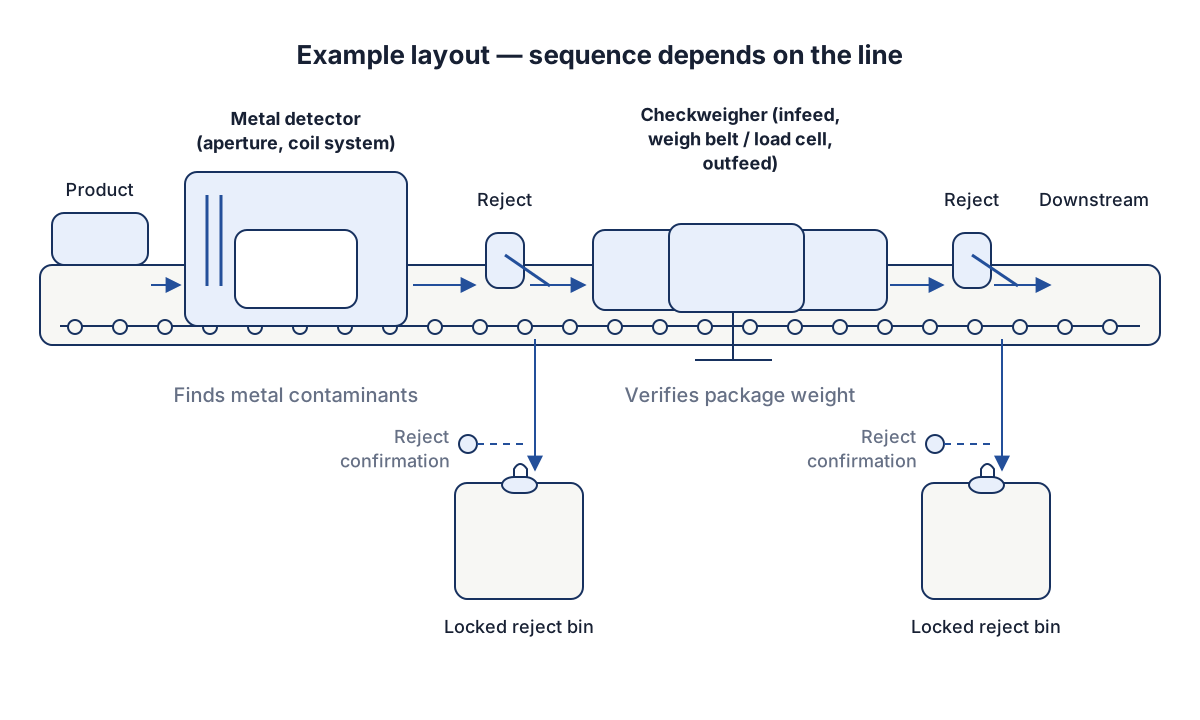
Figure 1 shows an example layout. The order of the machines, the position of the rejects and the number of inspection points all vary by line.
Checkweigher
A checkweigher weighs each pack while it moves. It has an infeed, a weigh belt supported on a load cell, and an outfeed. The controller compares the measured weight with limits set for the product and sends a reject signal to a diverting device when a pack falls outside them. Many also collect weight statistics that can feed back to the filler or weigher so the fill target can be adjusted.
Its job is to verify package weight. Where net quantity is regulated, the checkweigher supports the producer’s own control of that quantity. Relevant references include OIML R 87 on the quantity of product in prepackages, NIST Handbook 133 on checking the net contents of packaged goods in the US, and Council Directive 76/211/EEC for the EU average-quantity system. For the instrument itself, OIML R 51 covers metrological requirements for automatic catchweighing instruments. Which of these applies, and how, depends on the market and the product. This guide does not give legal advice.
Metal detector
A metal detector passes the pack through a coil system in an aperture. Metal in the pack disturbs the electromagnetic field and triggers a signal. The detector controls a food-safety hazard, foreign metal in the product. Its place in a food-safety system comes from the hazard analysis, the idea behind HACCP as described in Codex CXC 1-1969, General Principles of Food Hygiene. Retailer-recognized certification standards such as BRCGS Global Standard Food Safety include foreign-body detection requirements, and in the US the preventive controls framework in 21 CFR Part 117 may apply, depending on the product and the facility.
Detection performance depends on the product (some products conduct or carry moisture and salt, which affects the signal), the pack material (metallized film can interfere), the aperture size and the metal type and shape. A supplier can describe the detection approach, but sensitivity for your product has to be established with test pieces and your own packs.
X-ray inspection
X-ray inspection is a different technology. It detects dense foreign bodies in general, such as glass, stone or some plastics, and can also check for missing components or fill levels, depending on the system. It has its own trade-offs in cost, size, shielding and the products and packaging it suits, and it detects by density difference rather than conductivity. It is worth evaluating when your hazard analysis lists contaminants a metal detector cannot find. This guide does not cover X-ray systems further.
Why neither replaces the other
Swipe sideways to see the other columns. The first column stays visible.
| Question | Checkweigher | Metal detector |
|---|---|---|
| What does it verify? | Package weight against set limits | Absence of detectable metal in the pack |
| Why do you need it? | Net-quantity control and giveaway control | Control of a foreign-body hazard |
| What can it miss? | Contamination that does not change weight enough to be noticed | Weight errors of any size; non-metal contaminants |
| Main references | OIML R 87, NIST Handbook 133, Directive 76/211/EEC, OIML R 51 | Codex CXC 1-1969 (HACCP), BRCGS Food Safety, 21 CFR Part 117, depending on market |
| Typical records | Weight statistics, calibration or verification, reject counts | Challenge test results, reject counts, corrective actions |
A pack can have the right weight and still contain a metal fragment, and a pack can be metal free and underweight. If your quality plan identifies both risks, it needs controls for both; the plan determines whether separate machines, a combined unit or another verified arrangement provides that coverage. Decide from the quantity rules that apply to your product and from your hazard analysis, not from the cost of the equipment. For a line that also needs visible-feature or leakage checks, use the inspection equipment task map to separate those jobs before specifying the stations.
Layout and sequence
The example in Figure 1 puts the metal detector upstream of the checkweigher. Other lines place the checkweigher first, combine both in one housing, or put the metal detector before the final packaging so that the product is checked before it is sealed. The right order depends on where contamination can enter, which pack material the detector has to see through, whether the checkweigher needs a detector-free zone because of vibration or conveyor length, and how much floor space is available.
Questions to settle for the layout:
- Where in the process could metal enter, and is the detector placed after the last such point?
- Does the pack material or the product affect detection, and does it favor checking before or after packing?
- Does the checkweigher need a minimum straight run, and what pack spacing does it need at your rated speed in packs per minute?
- How are the machines integrated with the upstream filler and the downstream line for signals and stops? The line integration checklist covers those interfaces.
- Can the checkweigher’s data feed back to the filler? The guide on auger fillers and multihead weighers describes how the dosing step affects weight variation.
Reject, confirmation and locked bins
A detection is only useful if the rejected pack is actually removed and stays removed.
The reject mechanism, such as an air blast, a pusher, a diverting arm or a drop-through flap, has to suit the pack’s weight, shape and speed. Ask the supplier which reject method it proposes for your pack and how the timing is set.
A sensor at the reject point should confirm that the pack left the line. If it did not, the system should alarm or stop the line, according to your procedure. Without confirmation, a failed reject can reach the customer unnoticed.
Rejected packs go into a bin that only an authorized person can open, so nobody can return them to the line by mistake. The bin may have a full-bin sensor. Metal detector rejects are usually investigated and not simply discarded, because a detection can point to a source of contamination.
Keep records of the following, adapted to your procedure:
- Test or challenge checks: what test piece or reference weight was used, who ran the check, when, the result, and what was done on a failure.
- Reject counts and the reason for each investigation.
- Calibration or verification of the checkweigher by the method your market and customer require.
- Changes to settings, with the person, date and reason.
- Reject confirmation failures and the response.
The frequency and method of the checks come from your hazard analysis, your customer requirements and the supplier’s manual, not from this guide.
Machine vision is a third kind of inspection, with tasks such as reading codes or checking seals and labels. See machine vision for packaging inspection for what it can and cannot do.
Packaging inspection problems and solutions: false rejects and failed checks
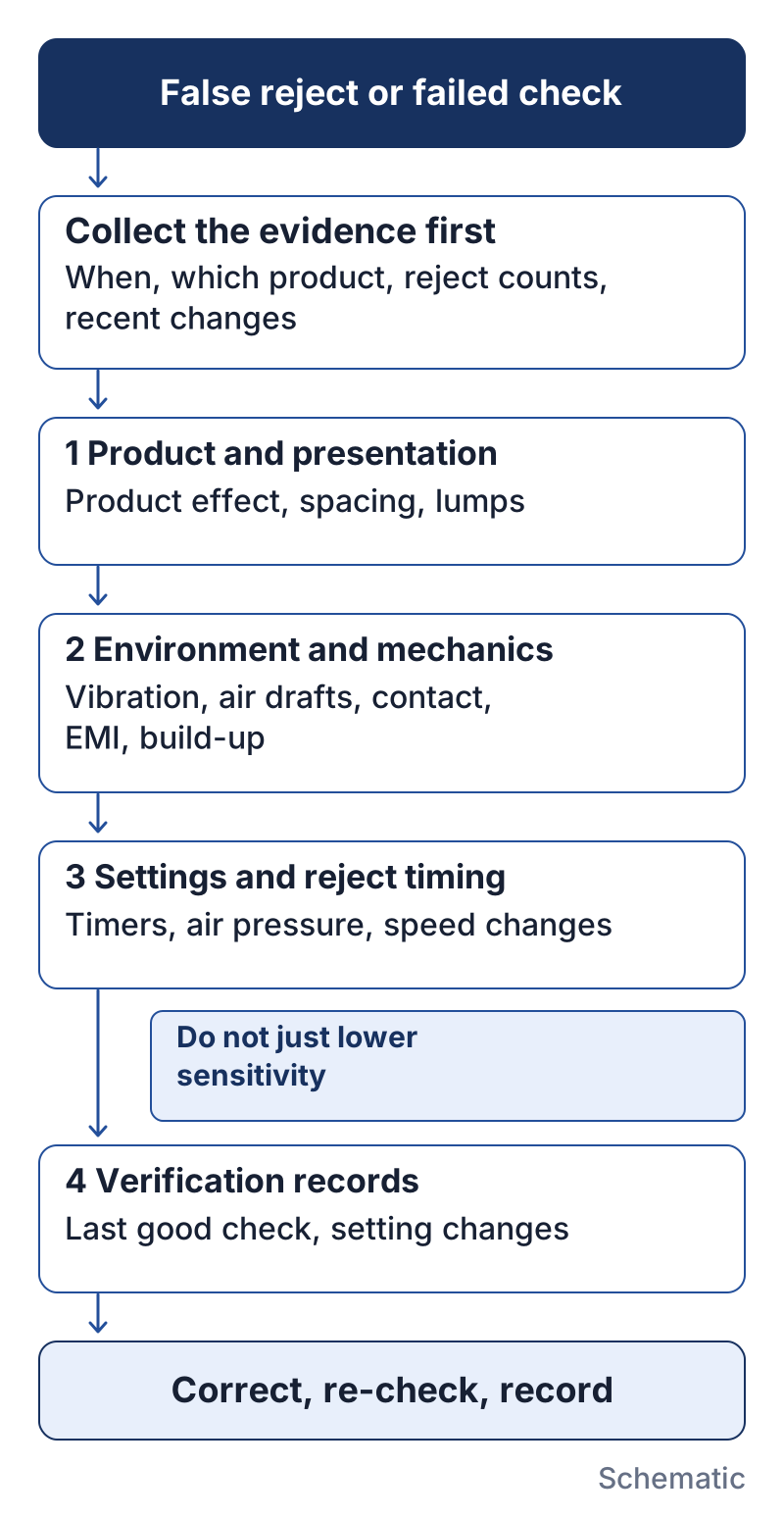
Most problems with in-line inspection fall into three groups: good packs rejected (false rejects), bad packs not removed (a missed detection or a failed reject), and routine checks that fail. Technical guides and manuals from equipment makers point to the same order of investigation: product and pack presentation, environment and mechanics, settings and reject timing, then the verification records. Work through them in that order and record what you find before anyone changes a sensitivity setting or a weight limit. The details below come from one checkweigher manual and one metal detection guide, so treat them as examples of what to check and follow the manual for your own machine.
Start with the evidence
Before adjusting anything, collect the facts: when the problem started, which product, format and recipe were running, the reject counts by reason, the time of the last successful check, and any maintenance, cleaning, setting or software change since then. A jump in rejects right after a product change or a washdown points to a different cause than a slow rise over weeks.
Checkweigher: false rejects and erratic weights
The in-motion checkweigher manual from Thompson Scale states that when a checkweigher shows erratic or inaccurate weights, or its reject devices actuate improperly, most root causes are mechanical, and it advises investigating the conveyors, framework and surrounding equipment first. The causes it lists include:
- Contact or interference between the weigh conveyor and the upstream or downstream conveyor, or photo-eyes and other sensors mounted on it.
- Worn or wrongly tensioned belts, out-of-round pulleys and loose drive components that put vibration into the scale.
- Low-frequency vibration, for example from forklift traffic, and a scale base rocking on an uneven floor.
- Air currents from fans, vents or open doors pressing on the conveyor surface.
- Packs too close together, so one pack has not left the weigh conveyor before the next arrives. The same manual notes that the automatic zero routine may not update when packs are too close or vibration is too high.
- Product build-up on the scale.
When the weight is right but the wrong pack is removed, or none at all, check the reject timer settings, the reject output and the reject valve or mechanism before suspecting the weighing.
Metal detector: false rejects
The manufacturer’s 2016 Safeline guide links false rejects to product variation, vibration, electrical interference and installation problems (§14.3.3, p. 81); product effect and packaging can also limit sensitivity (Chapter 3, pp. 18–25). Check these against the machine manual. Review sensitivity changes through the approved quality procedure rather than treating a lower setting as proof of a repair.
When a routine check fails
Record whether the device responded to the test and whether the pack actually left the line. Investigate the failed stage under the machine manual.
Safeline §12.6.2 (p. 68) relates check intervals to the time product remains available for quarantine; Chapter 13 (pp. 76–79) addresses suspect product after a failed check. Identify and hold affected lots under your site’s procedure, correct the fault, and record the repeat-check result and authorized disposition before release.
Write it into the inspection procedure
Whatever the packaging inspection machine, write these investigation steps into your packaging inspection procedure, so that the person on shift does not have to improvise. The records listed in the previous section, especially setting changes, check results and reject counts by reason, are what make the investigation possible. For camera-based inspection, false rejects have their own causes in lighting, presentation and timing, covered in the machine vision guide. If a false-reject problem appears during installation, it belongs on the commissioning and SAT punch list described in the FAT and SAT guide.
Investigation record to copy
Copy this field list into the site record; enter the actual outcome rather than only “test passed.”
Swipe sideways to see the other columns. The first column stays visible.
| Field | Entry |
|---|---|
| Date / time / product / lot | ________ |
| Machine / recipe / test piece or reference weight | ________ |
| Last successful check / suspect production interval | ________ |
| Detection or weight response | ________ |
| Actual rejection / confirmation result | ________ |
| Isolated lots / quantity / location / owner | ________ |
| Presentation / mechanics / environment observations | ________ |
| Settings as found / controlled change / approval | ________ |
| Repeat test / re-inspection result / disposition sign-off | ________ |
Questions to ask suppliers
- What is the detection principle, and how is sensitivity established for my product and pack material?
- Which test pieces or reference weights are supplied or recommended, and how are they used in a routine check?
- What is the rated speed in packs per minute for my pack length, and what pack spacing is assumed?
- Which reject methods are available, with confirmation and full-bin sensing, and how are rejects secured?
- How are settings protected, and how are changes logged?
- For the checkweigher, what documentation shows how the instrument has been assessed against the reference that applies in my market (for example OIML R 51)?
- What data can be exported, and in what format?
- What is included in the acceptance test, and how will it be done with my products? The guide to FAT and SAT covers how to define those criteria.
- What hygiene and washdown design applies, and what cleaning does the supplier recommend?
- What does the manual say to check first when false rejects rise, and which settings can operators change without a password?
Limits and on-site verification
This guide cannot say what sensitivity a metal detector will reach on your product, which weight limits apply to your net quantity, or what legal status any reference has. Those depend on your product, your market and your hazard analysis, and legal questions are for qualified advisers.
Verify both machines with your own products, packaging, line speed and test pieces on the actual line, during acceptance tests and on a recurring basis afterward. Supplier data describes a configuration, not your line.
Safety. The conveyors and reject mechanisms (air blasts, pushers, diverting arms) can move without warning, and the metal detector carries electrical equipment. Guarding and access to the reject area should follow a risk assessment under a method such as ISO 12100. Qualified personnel should do maintenance on reject devices, after isolating energy. Clear jams and retrieve rejected packs with guards and interlocks in place.
Related decisions
When you put an inspection step into a quote request, specify the product, pack, speed, reject method, records and acceptance tests, and ask each supplier to answer against the same list. The RFQ checklist gives a structure for this.
Method and source review
Manufacturer documents describe example equipment and controls, not our test results. Reviewed October 8, 2026:
- Mettler-Toledo Safeline, The Metal Detection Guide: Building an Effective Programme (2016): Chapter 3, pp. 18–25 (sensitivity); §14.3.3, p. 81 (false rejects); §12.6.2, p. 68 and Chapter 13, pp. 76–79 (quarantine and suspect product). The manufacturer’s guide entry is the primary access route. The cited edition was checked through a third-party Scribd-hosted copy; hosting does not make Scribd the author. The direct manufacturer PDF was access-blocked during this review.
- Thompson Scale, Model 4693 manual, Ver. 15.3, §§6.1 and 6.3, supports the mechanical and reject troubleshooting examples above; its original link is in References.
The record fields are an editorial aid; check timing, test pieces and product disposition remain subject to the site’s approved procedure.
References
- OIML R 87:2016 — Quantity of product in prepackages — OIML
- OIML R 51-1:2006 and R 51-2:2006 — Automatic catchweighing instruments (Part 1 and Part 2) — OIML
- NIST Handbook 133 (2026 edition) — Checking the Net Contents of Packaged Goods — NIST, Office of Weights and Measures
- Council Directive 76/211/EEC of 20 January 1976 on the approximation of the laws of the Member States relating to the making-up by weight or by volume of certain prepackaged products — Council of the European Communities (EUR-Lex)
- CXC 1-1969 — General Principles of Food Hygiene — FAO/WHO Codex Alimentarius Commission
- BRCGS Global Standard Food Safety, Issue 9 — BRCGS
- The Metal Detection Guide: Building an Effective Programme (Mettler-Toledo Safeline, 2016) — Mettler-Toledo Safeline Ltd
- Thompson Scale Company, Model 4693 Heavy-Duty In-Motion Checkweigher Manual, Ver. 15.3 — Thompson Scale Company
Update history
- : First published.
- : Separated inspection risks, added a traceable troubleshooting record and source locations, and replaced the small layout with vertical inspection paths.
- : Added a troubleshooting section on false rejects, missed rejects and failed routine checks, based on a checkweigher manual and a metal detection guide.
Next steps

Machine Vision for Packaging: Inspection Tasks and Limits
What machine vision can check on a packaging line, what each task needs in samples, lighting and rejects, and where it cannot replace other tests.
Read guide
FAT vs. SAT for Packaging Equipment: Defining Acceptance Criteria
Compare factory and site acceptance tests for packaging machines, and learn how to write acceptance criteria that both buyer and supplier can verify.
Read guide
Auger Fillers vs. Multihead Weighers: Matching the Dosing System to the Product
Compare auger fillers and multihead weighers by dosing principle, product flow, fragility, dust, cleaning and mixes, with supplier questions and trial guidance.
Read guide